Delete Your Account
Last Updated: 15th March, 2026
Delete from App (Recommended)
Follow these steps in the app to permanently delete your account:
Profile → Privacy → Danger Zone → "Delete Account Permanently"
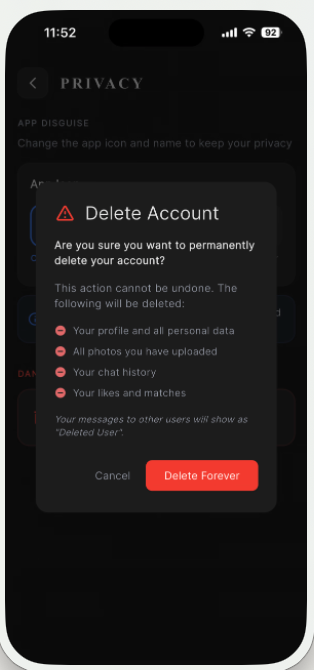
This will delete:
- Your profile and all personal data
- All photos you have uploaded
- Your chat history
- Your likes and matches
Step 1: Navigate to Profile
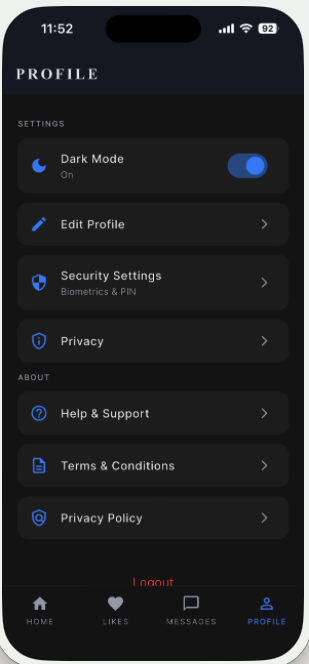
Step 2: Go to Privacy Settings
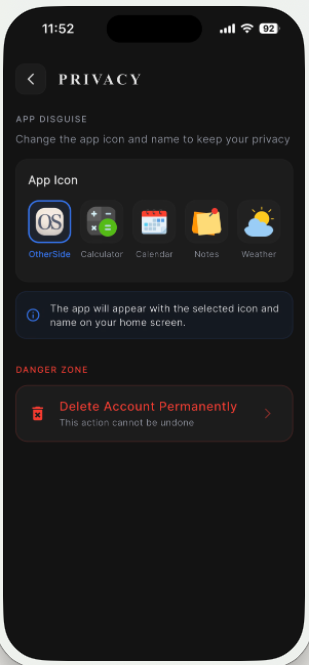
Step 3: Delete Account from Danger Zone
Email Request
Alternatively, you can request account deletion via email:
Email: support@youturn.co.in
Subject: "Delete My Account"
Include your registered email address in the message body.
Data Information
All data deleted within 30 days of account deletion request.
Transaction records may be retained as required by law for compliance purposes.
Once deleted, your account cannot be recovered. Please make sure you want to permanently delete your account before proceeding.